

⭐️ Announcing Sigrid IDE integrations for
Visual Studio Code,
JetBrains, and
Mendix Studio Pro.
You can use these integrations to check Sigrid findings as you work on your code, triage findings, and export findings to your issue tracker if you're not able to fix them right away.
Have you tried them? We'd love your feedback: Share it in our short survey.
You can use these integrations to check Sigrid findings as you work on your code, triage findings, and export findings to your issue tracker if you're not able to fix them right away.
Have you tried them? We'd love your feedback: Share it in our short survey.
Configuring Sigrid Single Sign-On with Okta ID via OpenID Connect
This page provides a OIDC integration example for Sigrid customers using Okta as their Identity Management Provider.
Creating an Application for Sigrid SSO
As an Okta administrator, create a new app integration using the OIDC sign-in method. Select Web Application as the application type.
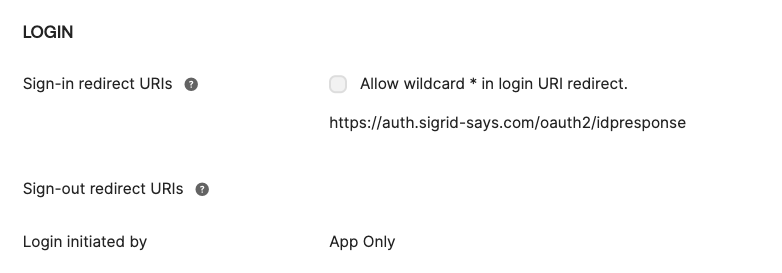
General OIDC Settings
- Application Type: Web
- Sign in Redirect URI: https://auth.sigrid-says.com/oauth2/idpresponse
- Login initiated by App Only
Attributes & Claims / Configure Profile Mapping
- Sigrid needs 3: email, first and last name, Okta includes the required claims by default.
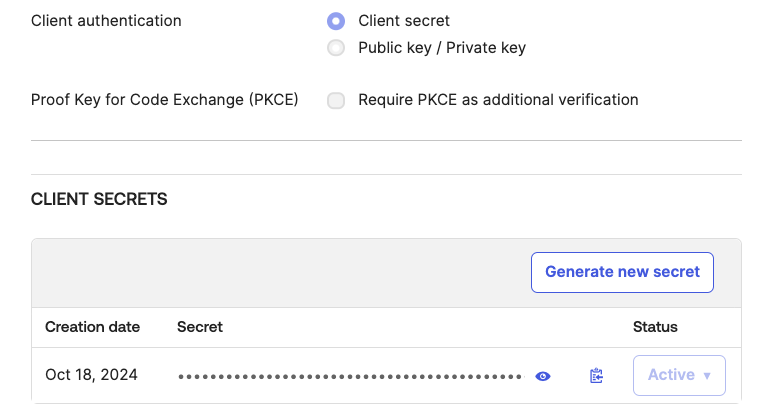
Client Secrets
- Go the Client secrets section and click ‘Generate new secret’.
Kindly ensure your secret is renewed on time and shared with the Software Improvement Group.
Contact and support
Feel free to contact SIG’s support team for any questions or issues you may have after reading this documentation or when using Sigrid.