

Sigrid Modernization Recipes MCP
Modernization Recipes gives AI agents a prioritized list of refactoring targets from Sigrid. The agent works through the list, fixes what it can, and marks each finding as resolved.
For installation instructions, see the MCP overview page.
Beta: Modernization Recipes is in early access. The current tools cover core refactoring workflows. We’re actively adding more.
Before you start
You need:
- A Sigrid account with at least one system
- The Sigrid MCP server connected to your AI coding agent (see installation)
- A local checkout of the system’s repository
- Your Sigrid customer and system identifiers — these are visible in the Sigrid URL:
sigrid-says.com/<customer>/<system>
Pass them in your prompt or add them to your agent’s context file (e.g. CLAUDE.md, .cursor/rules/).
Experimental example skills
We publish a set of example skills in the sigrid-ai-toolkit repository. These are experimental — they show what’s possible with the Recipes MCP tools and give you a starting point for your own workflows.
| Skill | What it does |
|---|---|
sigrid-diagnose |
Finds your weakest maintainability property and surfaces the highest-leverage refactoring candidates |
sigrid-improve |
Executes refactoring candidates with guardrail verification |
sigrid-ci-feedback |
Runs Sigrid CI locally and returns structured quality feedback |
fix-osh-risk |
Remediates open source health findings — creates merge requests or researched issues |
Install them directly as a Claude Code plugin, or browse the skill definitions and adapt them to your own agent and workflow:
/plugin marketplace add Software-Improvement-Group/sigrid-ai-toolkit
/plugin install sigrid-experimental@sigrid-ai-toolkit
Workflows
A few patterns for using Recipes with your AI agent. Adapt the prompts to your codebase, combine them, or do something different entirely.
Autonomous fixing
Give the agent a target property and your decision criteria, and let it work through findings in a loop. Works best when you can spell out what “good” looks like before it starts.
What to include in your prompt:
- Which maintainability property and technology to target
- Your coding principles and framework conventions (e.g. “we use the repository pattern for data access”). It is best practice to include these in your agent’s context file.
- When to fix vs. when to accept (e.g. “if the module is small and follows single responsibility, mark as accepted”)
- That it should update finding statuses as it goes
Example — direct fix:
Get unit size findings for [customer]/[system] in Java. Refactor the longest methods. Update each finding status when done.
Example — architectural refactoring:
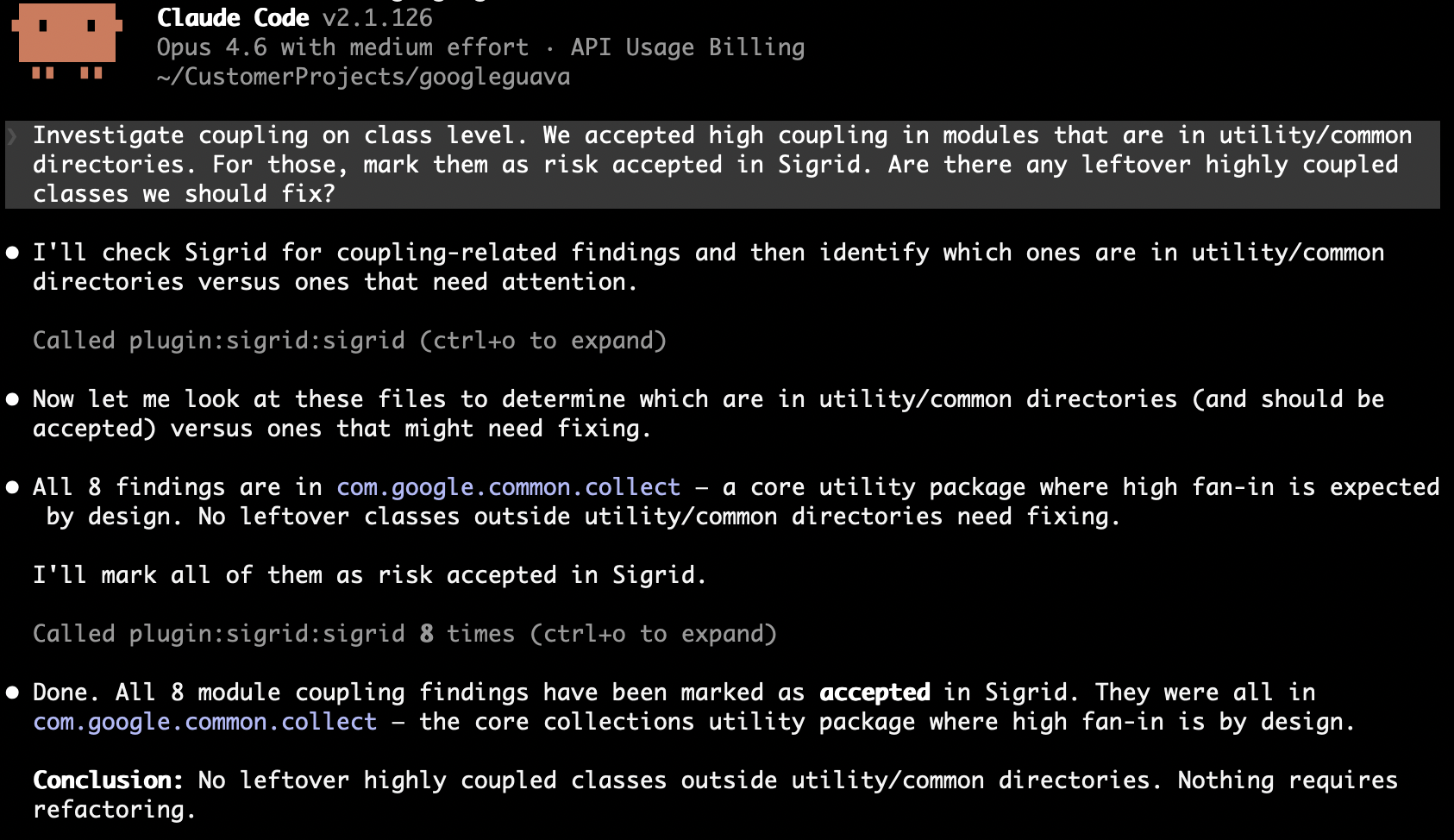
Get module coupling findings for [customer]/[system]. For each module, check whether it follows single responsibility. If it doesn't, split it into focused files. If it already has a clear single purpose and is small, mark as accepted. Update finding statuses to reflect your decisions.
Discovery and prioritization
The agent fetches findings, reads the surrounding code, and reports back without changing anything. Useful when you want an overview or a shortlist for ticket creation.
What to include in your prompt:
- Which property to analyze
- What you’re looking for (worst offenders, clusters of related issues, recurring patterns)
- How to present the results (ranked list, grouped by module, suggested next steps)
Example — maintainability overview:
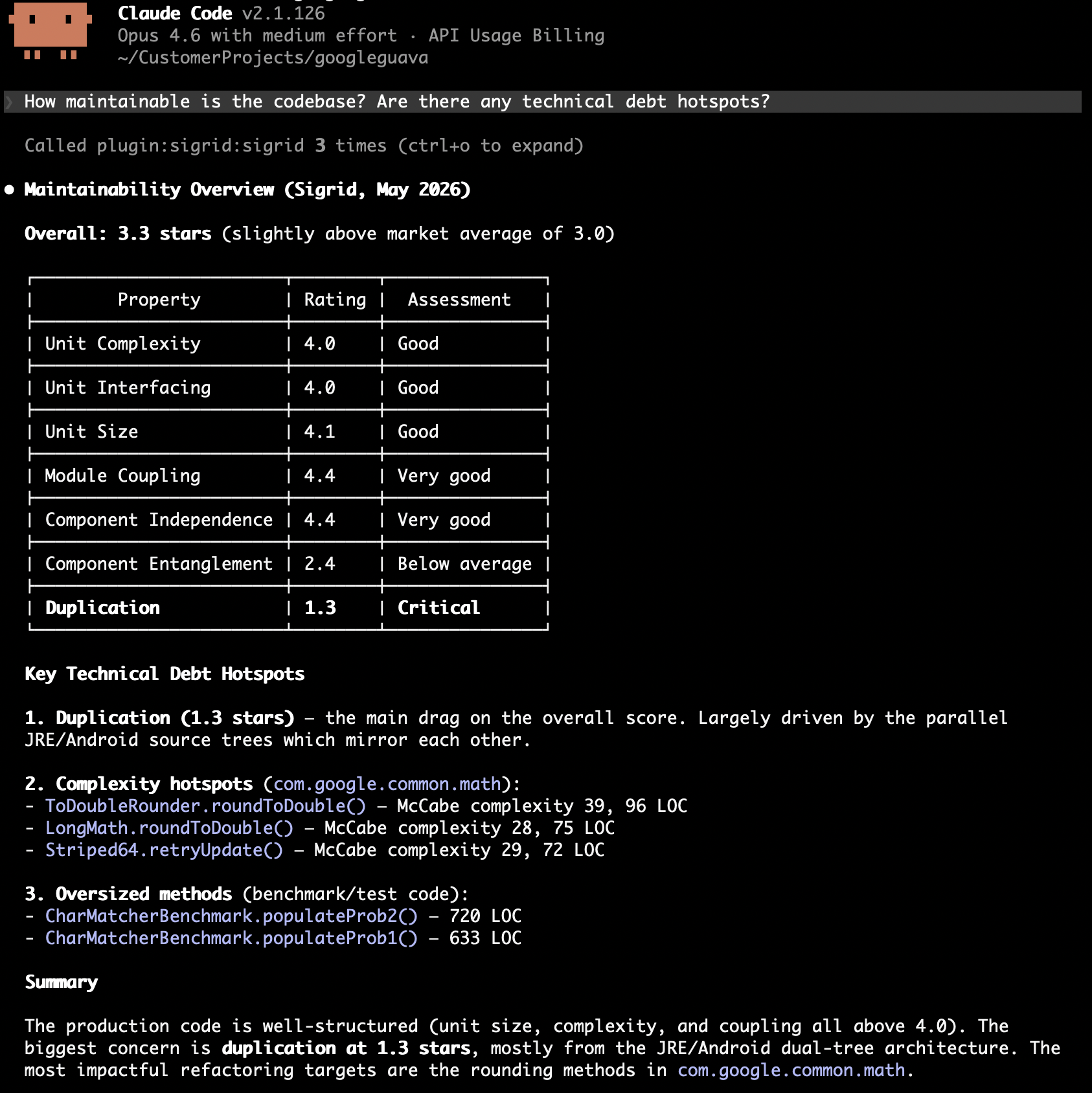
How maintainable is the codebase? Are there any technical debt hotspots?
Example — refactoring strategy:
Get maintainability findings for [customer]/[system]. What patterns do you see? Suggest a refactoring strategy before making changes.
Security and reliability triage
The agent fetches security or reliability findings, investigates each one in the code, and either fixes it or triages it with a rationale.
What to include in your prompt:
- Minimum severity level to focus on
- Your risk tolerance
- Whether to fix in place or just triage and report
Example — security findings:
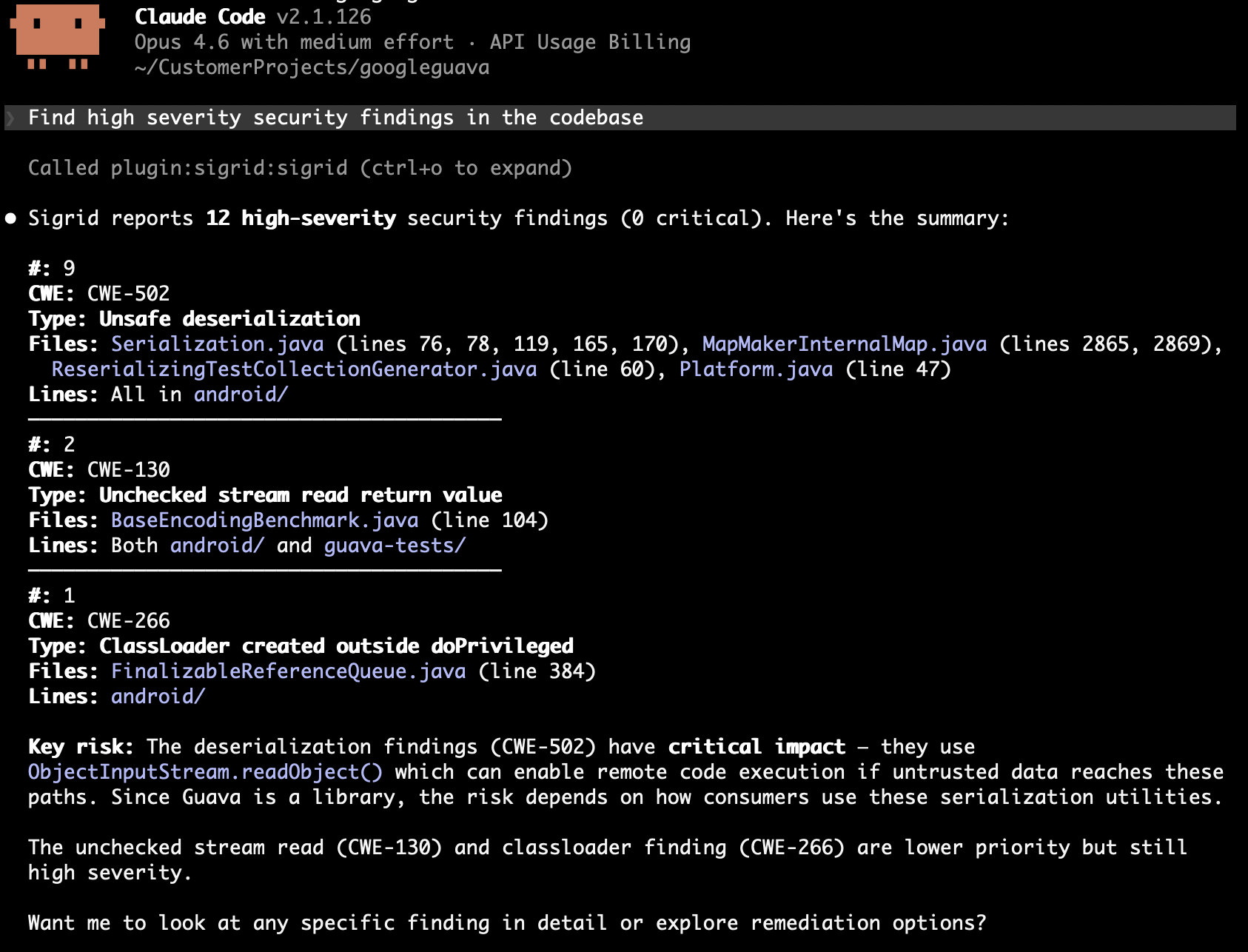
Find high severity security findings in the codebase for [customer]/[system]. Assess each one: is it exploitable given the context? Fix what you can, mark false positives with a justification.
Example — reliability risks:
Get reliability findings for [customer]/[system] with severity HIGH or above. Focus on error handling and concurrency issues. Fix straightforward ones and flag complex ones for manual review.
Open source health
The agent queries your open source dependencies for risks. Unlike security and reliability findings, open source health results are informational: there is no status to update, so the workflow is discover, prioritize, and report.
Example — component risk overview:
List open source components with high risk for [customer]/[system]. Which risk dimensions are causing the most concern? Group by dimension and suggest priorities.
Example — vulnerability triage:
Get critical and high severity vulnerabilities in our dependencies for [customer]/[system]. Which ones are in components we actively use? Suggest upgrade paths or alternatives.
Triage and execute
Split the work into two steps: triage findings first (mark as will-fix or accepted), then pick up the will-fix items and fix them. Both steps can happen in one session, or you triage now and execute later.
Example — triage:
Get the top 100 duplication findings for [customer]/[system]. We accept duplication in boilerplate configuration between microservices — mark those as accepted. Mark the rest as will-fix.
Example — execute after triage:
Get duplication findings for [customer]/[system]. Fix the ones I've previously marked as will-fix and update their status.
These compose: run discovery first, triage the results, then execute on the will-fix items. Or skip to autonomous fixing if you trust the criteria.
Tools reference
Seven MCP tools drive the workflows above.
| Tool | Description | Key parameters |
|---|---|---|
refactoring_candidates |
Ranked refactoring candidates for a maintainability property | property, optional: technology, limit |
maintainability_ratings |
Current maintainability ratings on a 0.5–5.5 star scale (3.0 = market average, 4.0 = target for new development) | Optional: component, technology breakdowns |
list_security_findings |
Open security findings ranked by severity and exploitability, with CWE identifiers and file locations | severity: LOW, MEDIUM, HIGH, CRITICAL. model: ow10 (default), sigsec, 5055sec, c25, pci4, owasvs4c, owasvs4s, lcnc10. path_prefix: filter by file path prefix (use long, specific prefixes) |
list_reliability_findings |
Open reliability findings (error handling, concurrency, resource management, IPC) ranked by severity | Same filters as security. model: sigrel (default), 5055rel. path_prefix: filter by file path prefix (use long, specific prefixes) |
list_open_source_risks |
Open source dependency risks across vulnerability, freshness, legal, activity, stability, and management — default tool for any open-source health question | risk_dimension: filter dimensions. risk_min: NONE, LOW, MEDIUM (default), HIGH, CRITICAL. limit |
list_open_source_vulnerabilities |
Known CVEs in open-source dependencies ranked by CVSS score | severity_min: LOW, MEDIUM (default), HIGH, CRITICAL. limit |
edit_finding_status |
Updates the status of a finding so Sigrid reflects the agent’s decisions | status — see below. Optional: remark |
Valid statuses for edit_finding_status:
| Finding type | Valid statuses |
|---|---|
| Maintainability | RAW, WILL_FIX, ACCEPTED |
| Security / Reliability | RAW, REFINED, WILL_FIX, FIXED, ACCEPTED, FALSE_POSITIVE |