

You can use these integrations to check Sigrid findings as you work on your code, triage findings, and export findings to your issue tracker if you're not able to fix them right away.
Have you tried them? We'd love your feedback: Share it in our short survey.
Building with an AI coding agent and Sigrid Guardrails
This guide walks through putting Guardrails in your coding agent’s build loop, so the agent checks the maintainability and security of every file it writes and fixes what it finds before you see the diff, then checks the whole change for architecture drift before you push.
Guardrails gives the agent the same analysis Sigrid Core runs, on the files it just changed, while it is still working on them. The checks are deterministic: the same metrics against the same thresholds every time, decided by Sigrid’s quality model and not by a model’s opinion of its own output.
Guided runs come out measurably better. We built the same system 20 times with Claude Sonnet 4.6, and the runs with Guardrails in the build loop had roughly 97% fewer high-risk security findings and a maintainability score roughly 24% higher than the runs that only had a written set of code principles. Every guided run scored better on maintainability than every unguided one. The experiment write-up has the method and the full results.
Use it whenever an agent writes code. How closely you read the result is a separate question from whether the code has to be secure and maintainable: anything you deploy, or come back to in six months, has to be both. If you read every diff, Guardrails saves you the review comments you were about to write. If you are vibe coding, it is the only thing between you and whatever the agent happened to produce.
To clear out technical debt that is already there, see reducing technical debt.
Prerequisites
- An agentic tool that supports MCP. The examples below use Claude Code.
- A Sigrid API token, which the plugin asks for once.
- A codebase in one of the supported technologies.
The quality gate reads the code in your working tree, so for that check the system does not have to be published to Sigrid first and the code does not have to be committed. The architecture drift check in step 3 compares your diff with Sigrid’s dependency graph, so it needs a published system.
Why the agent needs help
An agent knows it is done when the tests pass. Nothing in that loop tells it whether the code it wrote is any good.
So it takes the easy path, and you will recognize where that leads. Adding a few lines to an existing method is a smaller edit than splitting it, so methods keep growing, session after session, until the worst method in the file is the one the agent touched most. An agent also writes the patterns it has seen most often, and some of those are insecure: a query glued together from strings, a default that lets everything through, a permission check that runs after the work instead of before it. None of them fail a test.
The agent cannot see the standard it is supposed to meet, either. How long is too long for a method? How many branches are too many? Sigrid has a threshold for each of these, calibrated on a benchmark of real systems, and none of it can be read off the code. Guardrails gives the agent the answer for every file it touches: which guidelines the file breaks, where, how badly, and the threshold behind each one. “Too long” stops being a guess.
Set up Guardrails
Everything here applies to any agentic tool, and every tool has its own version of the four primitives involved. The Claude Code column is one example:
| Primitive | Generic | Claude Code |
|---|---|---|
| Persistent instructions | context file | CLAUDE.md |
| Tool access | MCP server | axis plugin |
| Reusable procedures | skills | axis plugin |
| Automatic enforcement | hook, git pre-commit, or a scheduled job | UserPromptSubmit hook, or a scheduled CI job |
On Claude Code, the plugin covers tool access and automatic enforcement together, so the second and fourth rows come from one install. Other tools need persistent instructions too, to fire the trigger.
1. Install the plugin
The plugin configures the Sigrid Axis MCP server and the skills together:
/plugin marketplace add Software-Improvement-Group/agent-integrations
/plugin install axis@sigrid
/axis:setup
The plugin asks for your Sigrid API token once and stores it in your system keychain. See authentication tokens for how to get one. The setup skill records your Sigrid customer and system in .sigrid/profile.md, which the agent passes to every Guardrails check. See the Sigrid profile. In another agentic tool, connect the MCP server instead. You need at least the guardrails_quality_check tool.
The plugin’s hook adds the quality gate to every prompt you send: before reporting a task done, run the Guardrails check on the production code you changed, and fix the maintainability findings, leaving one only when the code already honors the principles. Step 2 shows the exact text, for tools that need it added by hand.
Check it works before you rely on it:
Run the Sigrid guardrails quality check on <a file you changed recently>.
The tool takes one file at a time, and returns the maintainability guidelines that file violates, with a severity and a line range per unit, plus a separate list of security findings. A clean file returns both lists empty, so an empty result is a pass and not a failure to run.
2. Add the quality gate in other tools
On Claude Code, the hook already adds this text, so skip this step. In another tool, nothing adds it for you, so put it in AGENTS.md:
Principles: single responsibility, self-documenting code, simple control flow.
Before reporting done:
1. Run Sigrid guardrails_quality_check on changed production code (skip tests, docs, generated), with customer and system from `.sigrid/profile.md`.
2. Fix all maintainability findings judged against the principles — skip only if the code already honors them; say which and why.
3. Security findings: fix if contained, otherwise flag to user.
Two details in that text do the work, and both are easy to lose when you reword it. It names the tool, which makes the outcome verifiable: “check code quality” is advice, while “run Sigrid guardrails_quality_check on changed production code” is something you can confirm happened. And “before reporting done” attaches the check to a point every task passes through exactly once, which looser timing like “after every edit” does not give you.
The gate also lets the agent leave a finding alone when the code already honors the principles, as long as it says which and why. That clause is what keeps a small addition from turning into an afternoon of extractions.
To add your codebase’s own conventions, such as the design patterns it follows, extend the principles: in AGENTS.md on other tools, and in CLAUDE.md on Claude Code.
An instruction is followed most of the time, and the agent is the one who decides it has finished, so we would verify the gate for the first few sessions in a new repository. Where it really matters, back it with something mechanical: Sigrid CI in a pre-commit hook or in your pipeline runs the same checks whatever produced the code.
Use the model you already code with, and keep the checks in your session. To fix what a check finds, a subagent would have to read the file again, and without your session’s context it tends to make changes you did not want or skip findings for reasons it made up. See Choose a model.
3. Add the architecture drift check
The quality gate reads one file at a time, so it cannot see a new dependency between two directories. The architecture-drift skill checks the whole diff against Sigrid’s dependency graph for that. No hook adds this instruction in any tool, Claude Code included, so put it in CLAUDE.md in Claude Code and in AGENTS.md elsewhere:
Before pushing code or opening a pull request, run the architecture-drift skill.
If it reports drift, fix it, or explain why the new dependency is intended.
The check needs a system published to Sigrid and a Sigrid profile with your baseline branch, which the setup skill writes. For what a drift report looks like, see preventing architecture drift.
What a session looks like
Say you are adding a retrying file copy to a FileUtil class, and you ask for it like this:
Add a method to FileUtil that copies a file byte-by-byte with retry logic
The agent reads the surrounding class to pick up the patterns already in use, then adds copyFileWithRetry(File src, File dst, int maxRetries) at the end of it: argument validation, a retry loop, and a nested try-with-resources doing the copy itself. That is 34 lines. Without the gate, this is where it would report done.
The method does two unrelated jobs. One is the retry policy: how many attempts, what to log on a failure, when to give up. The other is the copy, a stream-to-stream loop with no interest in whether anyone retries it. That is a single responsibility violation, and it costs you on the next change more than on this one. You cannot adjust the retry policy without reading the copy loop, you cannot test the copy without driving it through the retries, and a unit carrying two responsibilities is longer and more deeply nested than either job needs alone.
Length and nesting are what Sigrid measures, so the check picks it up. The findings come back at medium severity, and the agent extracts the single-attempt copy into a private copyFileByteByByte(File src, File dst) helper, leaving copyFileWithRetry with the validation and the retry loop. That trades 6 lines for 13, and each method ends up with one reason to change.
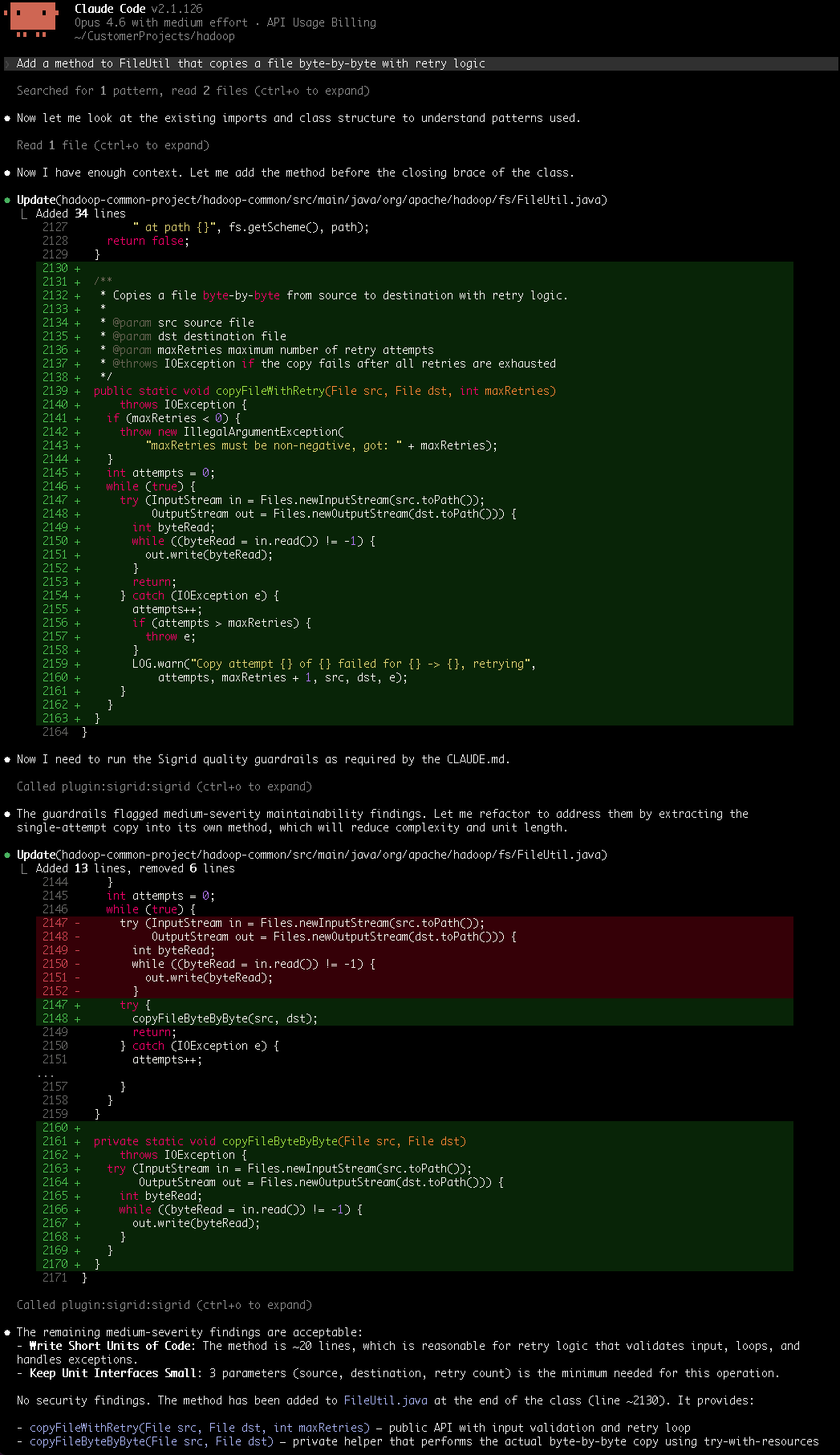
The second check is the part worth reading. It still reports two medium-severity findings, and the agent leaves both with a reason: copyFileWithRetry is around 20 lines, reasonable for something that validates input, loops, and handles exceptions, and its three parameters are the minimum the operation needs. No security findings.
Before you push, run the checks that see the whole change. /architecture-drift finds no references across directories, because the change stays inside FileUtil, and says so. For vulnerable dependencies and duplication, run Sigrid CI:
/change-feedback
It runs Sigrid CI on your working tree for maintainability, open-source, and security, and reports what the file-by-file check could not see, such as duplication across files. It publishes nothing to Sigrid, and it needs your token in a SIGRID_CI_TOKEN or SIGRID_TOKEN environment variable, separate from the one in your keychain.
Check that the gate fired
Your CLI shows tool calls, so look for at least one guardrails_quality_check call after the last edit. Look at the file list too: the tool takes one file per call, so a four-file change means four calls, and if only one shows up then the gate covered a quarter of your work.
Which files did you run the quality check on? List them against the files you changed.
Where to go next
Guardrails keeps new problems out of the code the agent writes. For the drift check in a real session, and for the problems your system already has, see:
- Preventing architecture drift for a session where the drift check catches a bypassed facade
- Reducing technical debt for the debt that is already there
- Triaging security and reliability findings for the findings Sigrid already knows about
- Guardrails for supported technologies and the tool itself